"Business Model Generator"
Usage Guide
How to Use
This page explains how to use the web app "Business Model Generator".
When you press the "Generate Idea" button, the "Products & Services" and "Business Models" will change randomly.
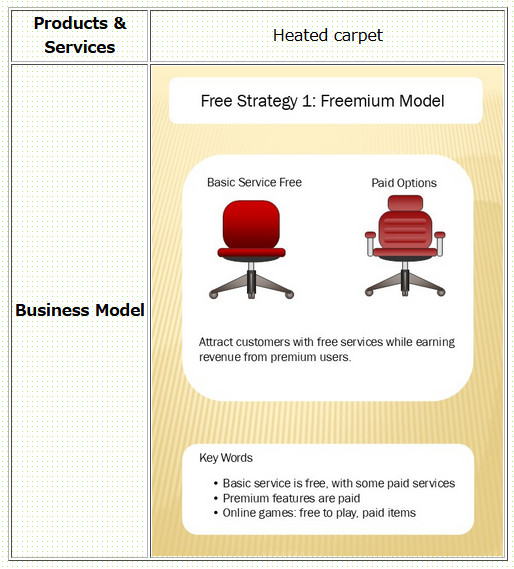
This feature allows you to randomly combine "Products & Services" with "Business Models".
The "Products & Services" section randomly displays a wide variety of products and services that exist in the market.
The "Business Model" section randomly displays famous business models commonly taught in business schools. The business models are shown using abstract model diagrams so they can be understood intuitively.
Additional Explanation
To help you better understand how to use the app, we will explain the components of the inventive principle section in detail.
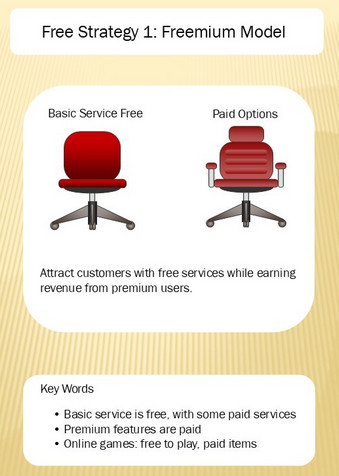
An image centered around a model diagram is displayed inside the inventive principle frame.
The image contains three idea-generation hints:
- Business Model
- Model Diagram
- Key Words
The Business Model shows the name of a famous business model.
The Model Diagram displays an abstract visual representation. This allows users to intuitively understand the business model visually.
The Key Words section displays companies that use the business model and hints for idea generation. Using real-world examples can make it easier to create new ideas.
There is one important thing to keep in mind: Do not become too fixated on the model diagrams or key words. Doing so may limit your freedom of creative thinking.
What Is the Category-Based Version?
The Category-Based Business Model Generator allows you to generate ideas within specific product categories. First, click "Category-Based Business Model Generator" from the left-side menu on the top page.
You will then move to a page containing links like the example below.
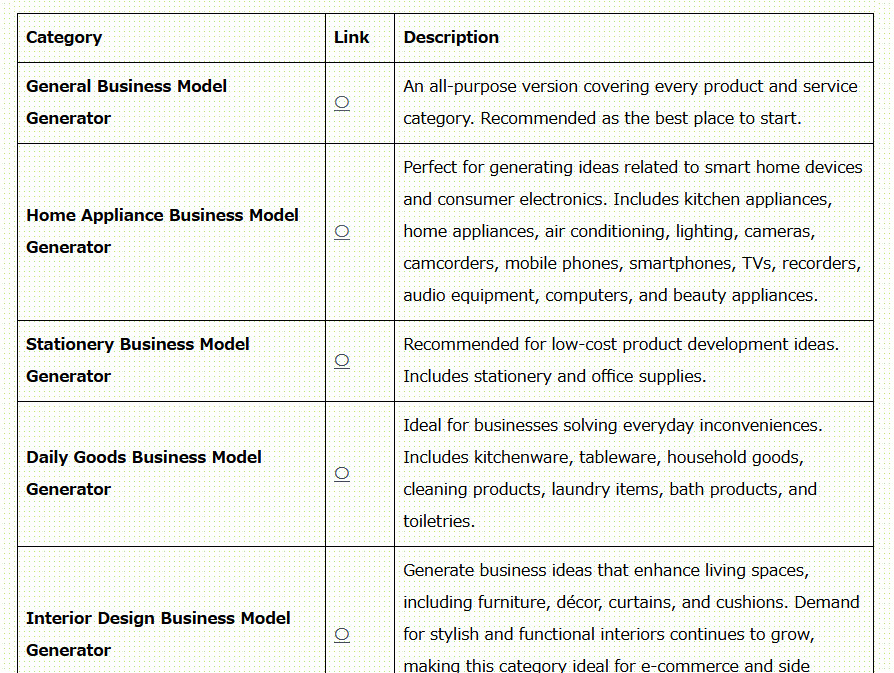
For example, imagine that you want to generate business ideas related to stationery products. In that case, it would not be useful if home appliances or food products appeared in the "Products & Services" section.
Therefore, in the Category-Based Business Model Generator, the "Products & Services" section randomly displays products and services belonging to a specific market category.
With this feature, even business owners who already operate a company can generate startup ideas and business ideas specialized for their own domain.
You can access the web app
"Business Model Generator" here.
Go to the Business Model Generator